
President FC: Football Club Owner · Manual
Home
The game and this guide are still in development. Details may change, and your feedback is welcome.
Screen guide
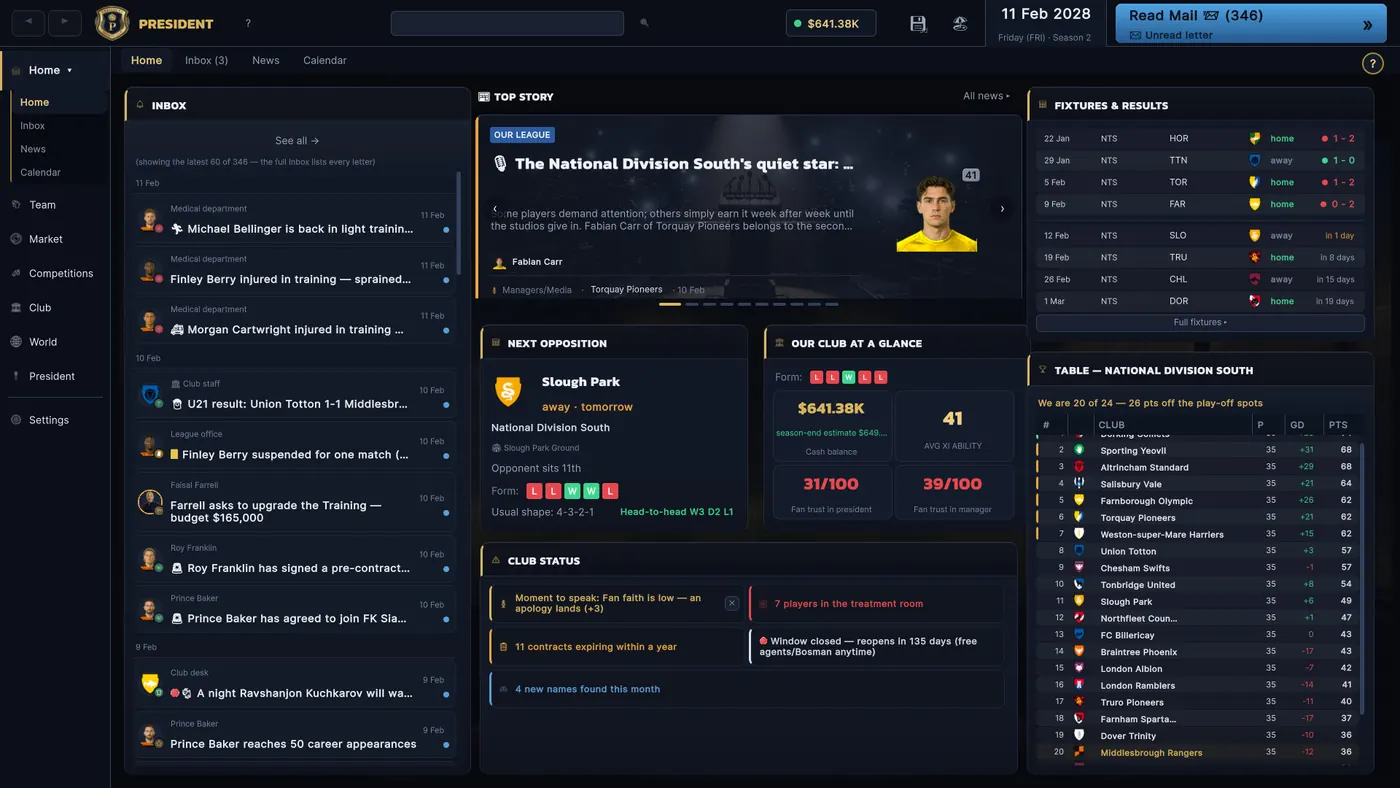
This is your office every morning — everything you need before advancing the day, in one place: mail awaiting answers, headlines, the next fixture, squad health and the league table. If nothing here is red or orange, you can advance the day with confidence.
Top strip «While you were away (n days)» — appears after skipping several days, summarised as chips: matches in our league, national-team games, tournaments played · Left column — the inbox: the first 3 deals awaiting an answer float to the top with a countdown in days, a blue dot means unread, click any letter to read it in full · Middle column — the rotating top story, the «Today in history» card, then the next-opposition card (recent form and head-to-head) and our club-at-a-glance row · the «Club status» strip under the news: anything to worry about — in the red, no manager, window closing, injury pile-up — shows as a badge here · Right column — «Fixtures & Results»: the last 5 real results and what's next (click a result row to open that season's fixtures at that match) and the full league table, scrollable
Decide what needs clearing before you advance the day — letters with a countdown genuinely expire, and once they lapse the chance is gone for good · Every tile on this page clicks through to the full page for that topic; no need to dig through menus
The "projected end of season" figure under your cash is a forecast from known income and outgoings — it is not money you have today, so don't plan a signing around it · The average-XI tile takes the raw ability of your eleven strongest players, while the Best 11 badge on the Squad page rates them in their actual positions in the manager's plan — those two numbers differing is normal
Chapters
Updated Sep 21, 2026